

Advertising · Transparency · Updated October 21, 2026
Advertising Disclosure: How Ads Work on FiftyStatePay
This advertising disclosure explains how FiftyStatePay makes money. We show ads from Google AdSense. They pay for the free calculators, and they never change a result.
You will also see how to limit ad personalization, how to report a bad ad, and what we promise about independence.
- Google AdSense ads
- Ads never change results
- No paid placement
- You control personalization
Last updated October 21, 2026 · By Hamza Akram · Contact us
Advertising Disclosure Summary
Quick answer
FiftyStatePay earns money from Google AdSense display ads. The calculators are free, and ads never change a calculation, a rate or a recommendation. Nobody can pay to appear in a result. We have no affiliate links today, and we will label any we add. You can limit ad personalization at any time.
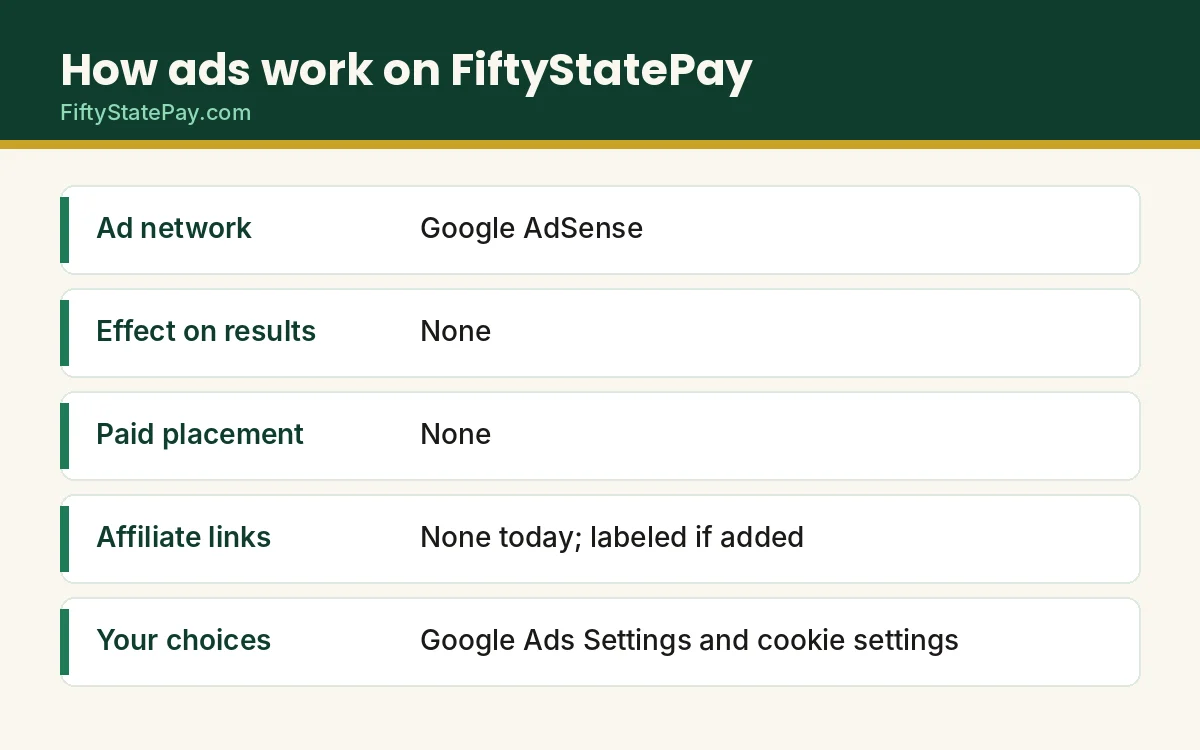
How Ads Work on FiftyStatePay
We use Google AdSense, a program that lets Google place ads on our pages. Google decides which ads to show, and it may place them automatically around our content. Google also labels its ads, so you can tell an ad from our own text.
When someone views or clicks an ad, we may earn a small amount. We do not know which advertisers appear or what they pay, and we cannot choose individual ads.
Why We Run Ads
Keeping 50 state calculators accurate takes real work. We must read new IRS and state rules, update the data, test every change and pay for hosting. Ads cover those costs, so the tools stay free and you never need to sign up.
Our Advertising Disclosure Promise: Ads Never Change Your Results
Results come from formulas
Every number comes from official rules, not from any advertiser.
No paid placement
Nobody can pay for a better result, ranking or review.
Content first
We write each page before we think about ads.
Clear separation
Ads are not meant to look like our content, and we never ask you to click them.
Advertising Disclosure: Affiliate Links and Sponsored Content
Today, FiftyStatePay has no affiliate links, no sponsored posts and no paid reviews. If that changes, we will label each one clearly near the link or post, and we will update this advertising disclosure the same day.
We follow the FTC Endorsement Guides, which require a clear disclosure whenever a sponsor or a commission could affect how you view a recommendation.
What You Will See and What We Do About It
You will mostly see display ads, such as banners and boxes, near our text. We want ads to stay out of the way of the calculators. If an ad covers a field or a button, tell us the page and your device, and we will fix it.
Please do not click ads unless you are interested in them. Ads only help the site when real people choose to look at them, and we never ask for clicks.
Ad Personalization and How to Limit It
Google may use cookies to show ads that fit your interests. You can limit this in several ways.
Open the privacy choices link.
It is in the footer and reopens your cookie and ad choices.
Visit Google Ads Settings.
Turn off personalized ads at adssettings.google.com.
Use opt-out pages.
The Digital Advertising Alliance and Network Advertising Initiative offer more choices.
Read the details.
Our privacy policy, cookie policy and Do Not Sell or Share page explain each choice.
Advertising Disclosure: Our Rules for Ad Placement
Ads follow clear rules here. First, they must look like ads, so we keep them apart from our own content. Next, they never sit inside a calculator result. Also, we never ask you to click one, because Google’s rules forbid that. If an ad is hard to tell from our content, please tell us, and we will fix the layout.
Since the site is new, the ad setup may change as we learn what readers prefer. So we update this page whenever we add a new type of ad or a new partner. You can always see the date at the top.
How to Report a Bad Ad
Most Google ads have an info icon or a menu where you can see why you got the ad or report it. Use it if an ad is misleading, offensive or broken.
You can also email hamzaakram789@gmail.com with the page link and a screenshot. We will pass the report to Google and, if needed, block the type of ad. Google’s AdSense Program policies set the rules advertisers and publishers must follow.
Frequently Asked Questions About Our Advertising Disclosure
How does FiftyStatePay make money?
Through Google AdSense display ads. The calculators, tools and guides are free, and we do not sell your personal information for money.
Do ads change the calculator results?
No. Results come from IRS and state formulas. No advertiser can change a calculation, a rate or a recommendation.
Does FiftyStatePay use affiliate links?
Not today. If we add any, we will label them clearly and update this page.
Can I turn off personalized ads?
Yes. Use the privacy choices link in the footer, or turn off personalization in Google Ads Settings. Ads may still appear, but they will use less of your data.
How do I report a bad ad?
Use the info icon or menu on the ad if there is one. You can also email us the page link and a screenshot, and we will report it.
Are ads marked as ads?
Google labels its ads, and we do not design our content to look like an ad. If you ever find an ad that looks like our content, tell us.
Ads are not endorsements
An ad on this site is not an endorsement by FiftyStatePay. Advertisers are responsible for their own claims. Please check any offer before you act on it.
Sources
- AdSense Program policiesGoogle
- Google Ads SettingsGoogle
- Endorsements, influencers and reviewsFederal Trade Commission Official
Choose your ad settings
Now that you have read our advertising disclosure, choose how much personalization you want.