

Accessibility · WCAG 2.2 · Always improving
Accessibility Statement: Built for Everyone to Use
This accessibility statement explains how FiftyStatePay works for people with disabilities, which standard we aim for, and how to tell us about a problem. Money tools should be easy to use for everyone, so we treat accessibility as part of quality.
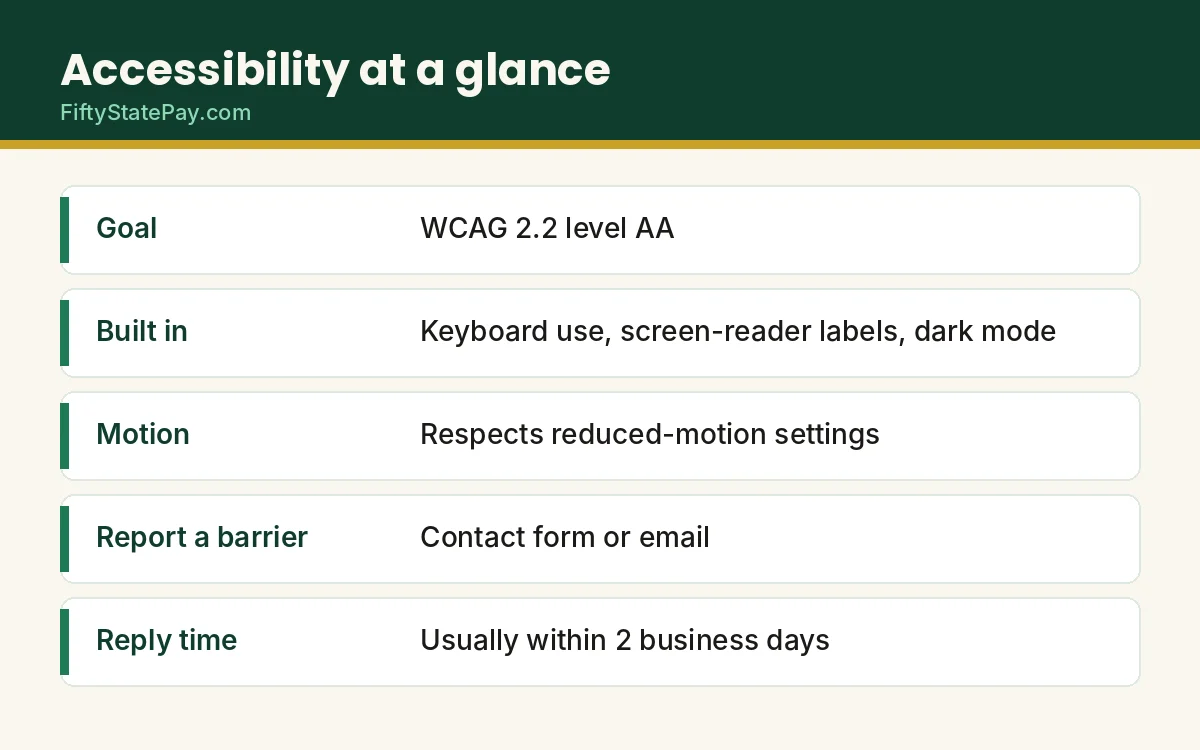
We aim to meet the Web Content Accessibility Guidelines (WCAG) 2.2 at level AA. We are not perfect yet, and this page says where we fall short.
- Goal: WCAG 2.2 level AA
- Keyboard and screen-reader support
- Dark mode and reduced motion
- A real person fixes reports
Last updated October 21, 2026 · By Hamza Akram · Contact us
Accessibility Statement Summary
Quick answer
FiftyStatePay aims to meet WCAG 2.2 level AA. The calculators work with a keyboard and a screen reader, use labeled fields and strong color contrast, and offer a dark mode. We have not had a third-party audit, and a few limits remain. If you find a barrier, tell us and we will fix it.
Our Goal: WCAG 2.2 Level AA
We follow WCAG 2.2 at level AA as our target. It is the standard most US organizations use to judge web accessibility, and it supports the aims of the Americans with Disabilities Act. The ADA.gov web guidance explains how the law applies to websites.
A goal is not a promise of perfection. Instead, it is a standard we measure ourselves against, and we fix gaps as we find them.
Accessibility Features Built Into FiftyStatePay
- Keyboard use: you can reach the calculators, menus and buttons with the Tab key and use them without a mouse.
- Screen readers: form fields have labels, and results are announced as they change.
- Color contrast: text and buttons use strong contrast, and we do not rely on color alone to show meaning.
- Dark mode: a light and dark switch helps people who are sensitive to bright screens.
- Reduced motion: animations calm down if your device asks for less motion.
- Zoom and small screens: pages reflow, so you can enlarge text and still read it on a phone.
- Plain language: we write at about an eighth-grade level and define every term.
Known Limitations and Workarounds
These are the gaps we know about today.
| Limitation | Workaround |
|---|---|
| The downloadable pay stub PDF may not work well with every screen reader. | Use the on-screen pay stub view, or download the CSV file. |
| Wide tables scroll sideways on small screens. | Rotate your phone, or use a larger screen, and ask us for the figures in text. |
| Ads and the consent message come from Google, so we cannot edit their markup. | Use the privacy choices link, or tell us about a problem, and we will report it. |
| We have not had a formal third-party accessibility audit. | Please report any barrier. We test fixes before publishing them. |
Tips for Using FiftyStatePay With Assistive Technology
- Press Tab and Shift+Tab to move between fields, and Enter or Space to press a button.
- Zoom your browser to 200% or more. The page reflows instead of cutting text off.
- Open the pay stub view for a simple list of every amount in order.
- Switch to dark mode, or turn on your device’s high-contrast setting.
- Use the CSV download if you prefer to read figures in a spreadsheet.
How We Check Accessibility
Before we publish a page, we aim to try it with the keyboard alone and run a browser accessibility checker. We also re-check the calculators when we change them. However, tools catch only some problems, so your feedback matters.
Standards and Laws We Keep in Mind
Many US sites look to WCAG because courts and agencies often refer to it. The U.S. Department of Justice says the ADA applies to the web, and it points to WCAG as a helpful yardstick. Meanwhile, Section508.gov shows what a good accessibility statement contains.
We are a small independent site, so we cannot promise that we meet every legal test. We can promise to listen, to fix problems quickly, and to say so when we do.
Tell Us About a Barrier
If you cannot use part of the site, please tell us. Email hamzaakram789@gmail.com or use the contact form. Include the page link, what went wrong, your browser, and any assistive technology you use.
We usually reply within 2 business days. When you ask, we will also give you the information in another format, such as plain text.
Frequently Asked Questions About Our Accessibility Statement
Is FiftyStatePay accessible?
We aim for WCAG 2.2 level AA and have built in keyboard support, labeled fields, strong contrast and a dark mode. A few limits remain, and this page lists them.
Does the calculator work with a screen reader?
It is built with labeled fields and announced results so that it works with common screen readers. If something does not read well, tell us and we will fix it.
Can I use the calculator with only a keyboard?
Yes. You can move through every field and button with the Tab key and use them without a mouse.
How do I report an accessibility problem?
Use the contact form or email hamzaakram789@gmail.com. Give the page link and describe what you could not do.
Does the site have a dark mode?
Yes. Use the light and dark switch in the header. The site also follows your device setting when you have not chosen one.
What standard do you follow?
WCAG 2.2 at level AA, published by the World Wide Web Consortium (W3C).
A goal, not a guarantee
This accessibility statement describes our goal and our current state. We keep improving, and we welcome reports of anything that gets in your way.
Sources
- Web Content Accessibility Guidelines (WCAG) 2.2W3C
- Guidance on Web Accessibility and the ADAU.S. Department of Justice Official
- Website Accessibility StatementSection508.gov Official
Help us improve accessibility
Your report makes the site better for the next person. If something got in your way, tell us.